
MTS Sales Path | Visual Pipeline & Journey for SuiteCRM
Standardize your sales process. MTS Sales Path embeds a highly visual, interactive status chevron at the top of your CRM records, guiding your team through the exact steps needed to win deals.
Why Use a Visual Sales Path?
- Instant Context: See exactly where an Opportunity or Lead stands without reading through history logs.
- Guided Selling: Provide reps with key fields and coaching advice specific to their current stage.
- One-Click Progression: Move deals to the next stage by simply clicking the chevron path—no page reloading needed.
- Faster Onboarding: New hires instantly understand your company’s pipeline methodology.
📸 Visual Walkthrough & Interface Preview
Take a visual tour of the features and settings:
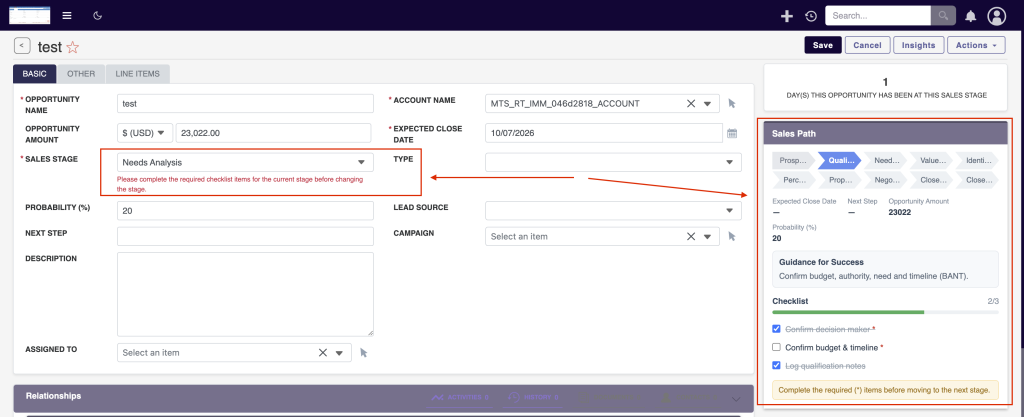
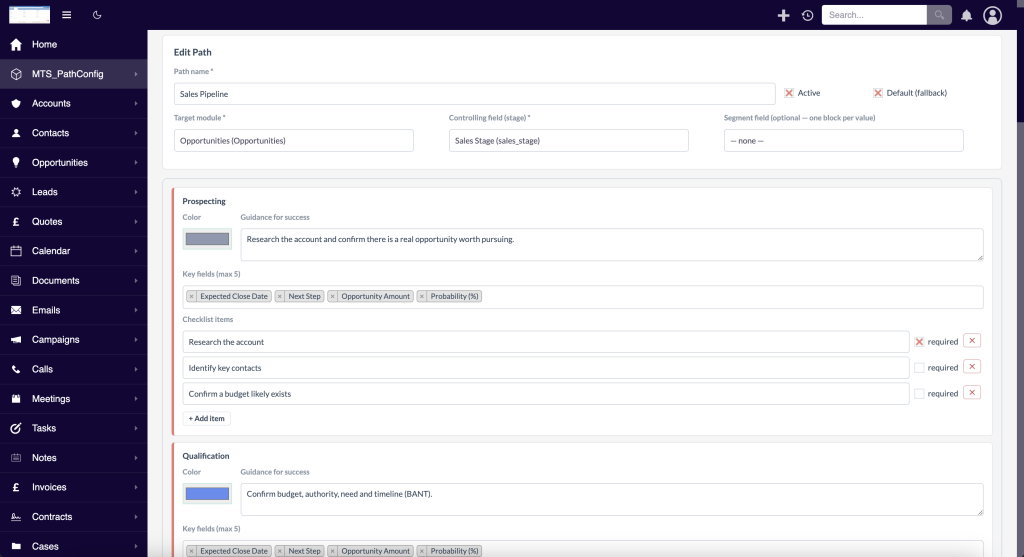
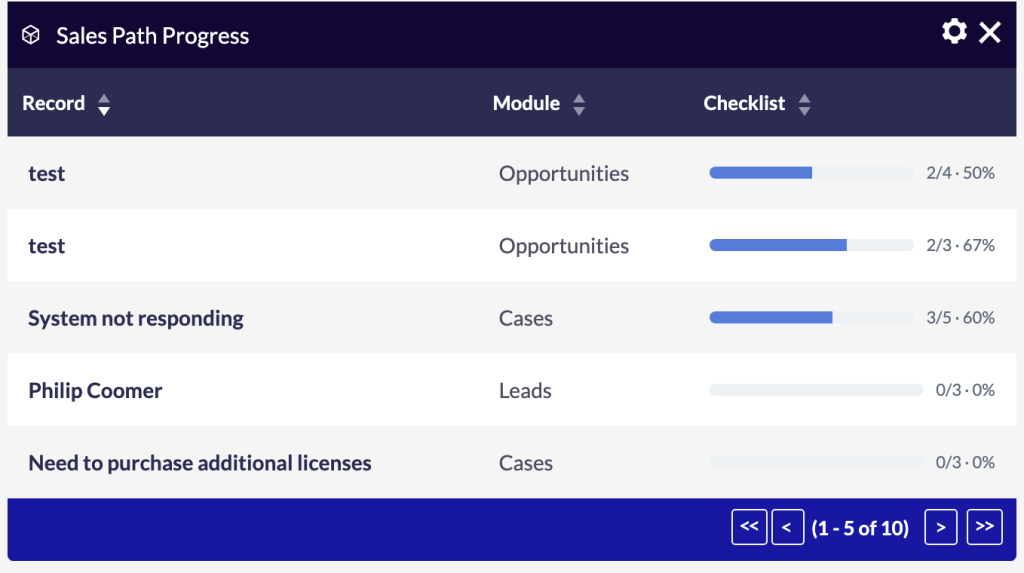
Drive revenue with structured sales execution:
Interactive Chevrons
Salesforce-inspired visual progress bars that dynamically map to any dropdown field (Sales Stage, Lead Status, etc.).
Stage-Specific Guidance
Display custom tips, required actions, and key fields directly underneath the path based on the current active stage.
Color-Coded Statuses
Highlight won deals in green, lost in red, and active in blue, providing immediate visual feedback to management.
Installation & Setup Guide
Build visual, interactive progress chevrons to guide your sales teams to success.
1. How to Install
- Log into SuiteCRM as an Administrator.
- Navigate to Admin > Module Loader.
- Upload the plugin ZIP file and click Install.
- Run a Quick Repair and Rebuild.
2. Creating Your First Sales Path
Go to Admin > MTS Sales Path to launch the configuration wizard.
- Target Module: Select Opportunities, Leads, or Cases.
- Status Field: Choose the dropdown field that dictates progress (e.g.,
sales_stage_dom). - Configure Stages: For each stage, define Coaching Tips, Required Fields, and the Chevron Color (Active, Complete, or Lost).
3. Displaying the Chevron
Automatic Injection: Once activated, the Sales Path automatically injects itself at the very top of the Detail View for the selected module. No manual layout editing in Studio is required.
No changelog entries yet.
Can I use Sales Path on custom modules?
Does clicking a stage update the record automatically?
Can we define different paths for different pipelines?
Related SuiteCRM Plugins
SuiteCRM Group Layout: Custom Views per Security Group in SuiteCRM 8
Is your CRM cluttered with unnecessary fields, irrelevant tabs, or complex list columns that confuse your team? A generic interface rarely fits a growing organization. Sales representatives need quick access to lead stages, while managers require high-level reporting fields. Showing the exact same form layout to every department leads to data errors and lower CRM […]

MTS Opportunity Line Items
Bridge the gap between Opportunities and Quotes by adding full line-item product tracking, automated totals, and 1-click quote conversion.
MTS Kanban for SuiteCRM
MTS Kanban is a SuiteCRM Kanban board plugin — drag-and-drop cards across stages on Opportunities, Leads, Cases & custom modules in SuiteCRM 7 & 8. Try it today.
Request this plugin
We don't run automated checkout yet — every order goes through a short form so we can confirm your SuiteCRM version, license type, and send a secure payment link.