
SuiteCRM Field Level Access Control for SuiteCRM 8
SuiteCRM field level access control for SuiteCRM 8: hide sensitive fields or make them read-only per role, enforced in the UI, the API, exports and saves.
SuiteCRM roles control access to whole modules, not to single fields. If you want sales reps to see an Account but not its Annual Revenue, or to read a discount but not change it, the standard answer has been custom code. The popular field-level add-on on the official store only supports SuiteCRM 7, which left SuiteCRM 8 users without a ready-made option.
MTS Field Access Control fills that gap. It is built natively for SuiteCRM 8, installs with Module Loader, and does not modify core files.
What is MTS Field Access Control?
It is a field-level security plugin for SuiteCRM 8. For every role, module and field you choose one of six access levels, from full Read/Write to None (hidden). Users get the most permissive or most restrictive level across their roles, depending on your setting, and administrators are exempt unless you say otherwise.
Unlike front-end-only tricks that just hide an input, the rules are applied on the server. A hidden field is removed from the data the SuiteCRM 8 API returns, and a read-only field cannot be changed through inline edit, mass update, import or the V8 REST API.
Key Features of SuiteCRM Field Level Security
- Six access levels per field: Not Set, Read/Write, Read/Owner Write, Read Only, Owner Read/Owner Write and None.
- Role-based, including Security Groups: rules follow SuiteCRM roles, optionally including roles inherited through Security Groups.
- All views covered: list view, record (detail/edit) view, subpanels, filters, mass update and inline edit.
- Data protection, not just UI: hidden values are stripped from API responses, so they never reach the browser.
- Write protection: read-only fields are kept unchanged on every save path, including import and the V8 API.
- Reports and CSV export: optionally hide restricted fields in Reports and remove them from CSV exports.
- Works with custom modules and custom fields created in Module Builder and Studio.
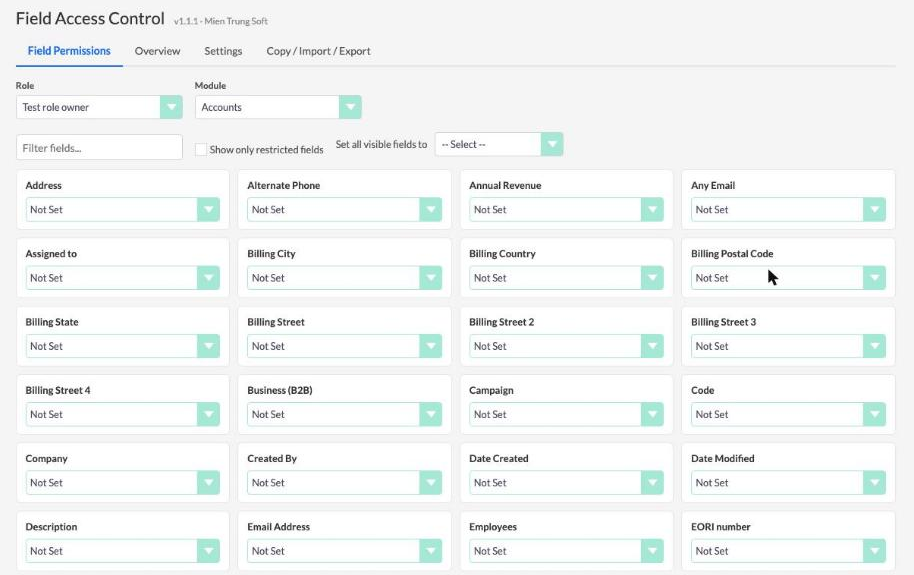
- Fast admin screen: a 4-column permission grid with field search, “show only restricted fields” and “set all” in one click.
- Copy, import and export rules: copy a role’s rules to another role, move rules between instances as JSON, and clean up orphan rules.
- Upgrade-safe: no core changes; built with the SuiteCRM 8 extension framework and standard logic hooks.
Common Use Cases
- Hide Annual Revenue, margins or cost prices from sales reps while managers keep full access.
- Make Assigned to, Amount or Sales Stage read-only for junior staff so only team leads can change them.
- Let only the record owner edit a commission or discount field (Owner Write).
- Keep personal data such as birthdate, ID numbers or bank fields visible only to HR or finance roles, a practical help for GDPR-style data minimisation.
How SuiteCRM 8 Field Access Control Works
An administrator opens Admin → Field Access Control, picks a role and a module, and sets the access level for each field. When a user signs in, the plugin resolves their roles and applies the effective rule in three layers:
- View metadata: hidden fields are removed from list, record, subpanel, filter and mass update definitions; read-only fields are rendered as read-only.
- Data: values of hidden fields are removed before records are sent to the SuiteCRM 8 front end or API clients.
- Saves: on every save, protected fields are restored to their stored value, so no channel can change them.
Compatibility
SuiteCRM 8.x (tested on SuiteCRM 8.10.2), PHP 8.1+. One license covers unlimited users.
Access levels
| Access level | What users in the role can do | Status |
|---|---|---|
| Not Set | No restriction from this plugin; normal SuiteCRM role access applies | Supported |
| Read/Write | See and edit the field | Supported |
| Read/Owner Write | See the field; only the record owner can edit it | Supported |
| Read Only | See the field, never edit it | Supported |
| Owner Read/Owner Write | Only the record owner can see and edit the field | Supported |
| None | Field is hidden everywhere and its value is not returned | Supported |
Where rules are enforced
| Area | Description | Status |
|---|---|---|
| List view & filters | Hidden columns and filter fields removed | Supported |
| Record view | Detail and edit mode, inline edit | Supported |
| Subpanels | Restricted columns removed | Supported |
| Mass update & import | Protected fields cannot be overwritten | Supported |
| API (GraphQL & V8 REST) | Hidden values stripped, writes blocked | Supported |
| Reports & CSV export | Optional, per setting | Supported |
| Custom modules & fields | Module Builder and Studio fields | Supported |
1 Requirements
- SuiteCRM 8.x (tested on 8.10.2)
- An Administrator account
- At least one role in Admin → Role Management with users assigned to it
2 Installation
- Sign in as an Administrator and open Admin → Module Loader.
- Upload the
MTSFieldAccessControl-x.y.z.zippackage and click Install. - Open Admin → Repair → Quick Repair and Rebuild.
- Reload the browser so SuiteCRM 8 picks up the new admin labels.
LBL_MTS_FIELD_ACL_SECTION, run Quick Repair and Rebuild again and reload.3 Opening the management screen
Go to Admin → MTS Field Access Control → Field Access Control. The screen has four tabs: Field Permissions, Overview, Settings and Copy / Import / Export.
4 Setting field permissions
- Choose a Role and a Module. All fields of the module appear in a grid.
- Pick an access level for each field. Fields you have configured are highlighted.
- Use Filter fields, Show only restricted fields or Set all visible fields to to work faster.
- Click Save. To remove a restriction, set the field back to Not Set and save.
5 Settings
- Enable field access control: master switch.
- Apply rules to administrators: off by default, so admins always see everything.
- Include roles assigned through Security Groups.
- Apply write restrictions when creating records.
- Hide restricted fields in Reports and Remove restricted fields from CSV export.
- Let workflows and scheduled jobs update protected fields, and optionally apply rules to command line / cron processes.
- Multiple roles: use the most permissive or the most restrictive rule when a user has several roles with a rule for the same field.
6 Copy, import and export
- Copy rules between roles (replaces the rules of the target role).
- Clean up orphan rules that point to a deleted role, module or field.
- Export all rules as JSON and import them on another instance; roles are matched by name.
Does it work on SuiteCRM 7?
Is a hidden field only hidden in the browser?
Which rule applies if a user has several roles?
Are administrators affected?
Does it support custom modules and Studio fields?
Do I need to modify core files?
I changed a rule but the user still sees the field. Why?
Related SuiteCRM Plugins
MTS Custom Login Page for SuiteCRM | Professional Branded Portal
Transform your SuiteCRM 8 login screen with custom logos, responsive templates, and dynamic background slideshows. No coding required.
SuiteCRM Group Layout: Custom Views per Security Group in SuiteCRM 8
Is your CRM cluttered with unnecessary fields, irrelevant tabs, or complex list columns that confuse your team? A generic interface rarely fits a growing organization. Sales representatives need quick access to lead stages, while managers require high-level reporting fields. Showing the exact same form layout to every department leads to data errors and lower CRM […]

MTS Theme Builder (SuiteCRM 7)
Personalize SuiteCRM 7 with your brand colors, custom navigation menus, custom fonts, and a branded company login page without coding.
Request this plugin
We don't run automated checkout yet — every order goes through a short form so we can confirm your SuiteCRM version, license type, and send a secure payment link.