
MTS Telegram Notify
Instant Telegram Bot Notifications & Group Alerts for SuiteCRM Triggers
Send real-time alerts for new leads, deal closures, critical support tickets, and task assignments directly to Telegram users and group chats.
Why Choose MTS Telegram Notify?
- Instant mobile notification delivery with 99.9% open rates via Telegram.
- Notify entire sales teams in shared Telegram channels when major deals close.
- Private direct message alerts when records or tasks are assigned to individual users.
- Custom message templates supporting emojis, markdown formatting, and direct CRM links.
Key Capabilities & Features
- Telegram Bot API Integration: Connect your own custom Telegram Bot via API Token in under 2 minutes.
- Channel & Group Broadcasting: Send formatted announcements to unlimited group chats and private channels.
- 1-Click Direct Record Links: Includes direct HTTPS links in messages to open records instantly in SuiteCRM.
- Custom Trigger Rules: Trigger messages on record creation, specific field changes, or schedule thresholds.
Popular Business Use Cases
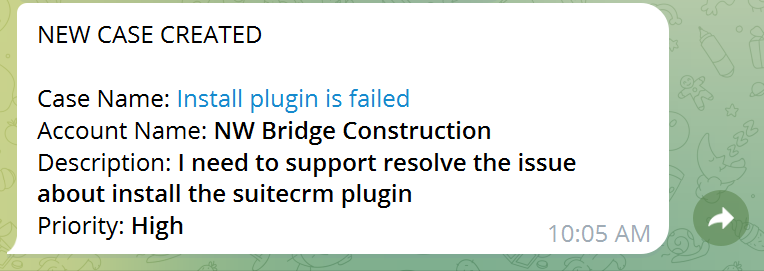
- Broadcasting ‘New Lead Assigned’ alerts with phone and email directly to rep smartphones.
- Alerting the DevOps and Support channel immediately when an urgent ticket is logged.
- Celebrating closed-won deals in the company-wide sales channel.
Enterprise Grade & Upgrade-Safe: Built strictly following SuiteCRM architecture standards. All modifications are stored safely in upgrade-resistant directories, ensuring smooth transitions across CRM version updates.
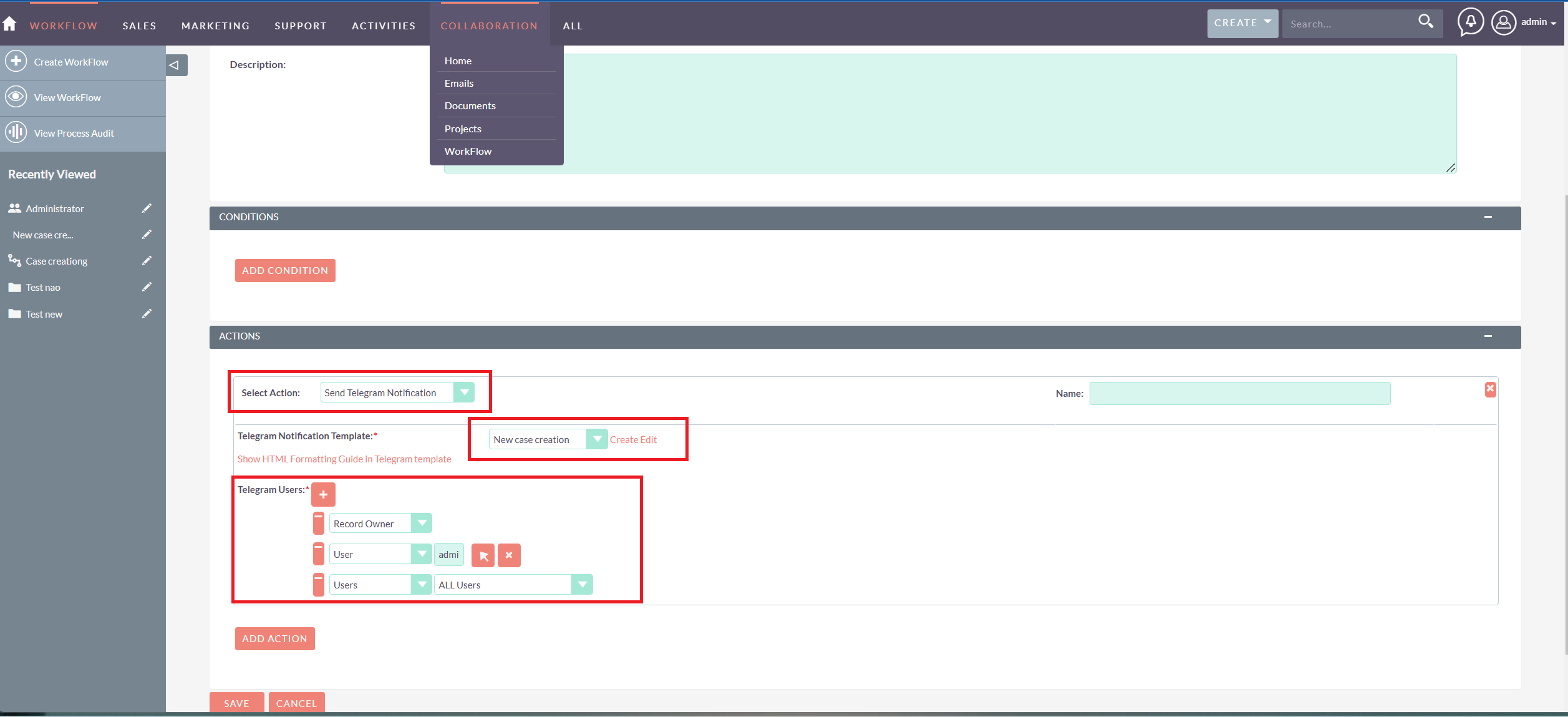
📸 Visual Walkthrough & Interface Preview
Take a visual tour of MTS Telegram Notify features, intuitive layouts, and configuration options inside SuiteCRM:
Feature Breakdown for MTS Telegram Notify
Explore the core functionality, productivity tools, and administrative capabilities included with this plugin.
Telegram Bot API Integration
Connect your own custom Telegram Bot via API Token in under 2 minutes.
Channel & Group Broadcasting
Send formatted announcements to unlimited group chats and private channels.
1-Click Direct Record Links
Includes direct HTTPS links in messages to open records instantly in SuiteCRM.
Custom Trigger Rules
Trigger messages on record creation, specific field changes, or schedule thresholds.
MTS Telegram Notify - Documentation & Setup Guide
1. Prerequisites & System Requirements
- CRM Compatibility: SuiteCRM 7.10 - 7.14 and SuiteCRM 8.0 - 8.7+
- PHP Version: PHP 7.4, 8.0, 8.1, 8.2, or 8.3
- Database: MySQL 5.7+ / MariaDB 10.3+
- Admin Privileges: Full SuiteCRM Administrator account required for installation.
2. Installation via Module Loader
- Download the installation package (
mts-telegram-notify.zip) from your Mien Trung Soft account. - Log in to your SuiteCRM dashboard as an Administrator.
- Navigate to Admin > Module Loader.
- Under Upload Installation Package, click Choose File and select
mts-telegram-notify.zip. - Click Upload.
- Once uploaded, locate the module in the list and click Install.
- Review and accept the license terms, then click Commit.
- After installation completes, navigate to Admin > Repair and run Quick Repair and Rebuild.
3. Configuration & Administration
Go to Admin > MTS Telegram Notify. Enter your Telegram Bot Token, link user Telegram Chat IDs, and set up notification trigger templates.
Configure user role permissions under Admin > Role Management if you wish to restrict module access to specific teams or security groups.
4. Troubleshooting & Support
- Assets not loading? Run Quick Repair and Rebuild and clear your browser cache (Ctrl+F5 or Cmd+Shift+R).
- Permission issues? Ensure correct file permissions on your SuiteCRM server (
chmod -R 755 custom/ modules/). - Need technical assistance? Contact our dedicated support team via your Mien Trung Soft portal or email us with your CRM error logs.
Is MTS Telegram Notify compatible with SuiteCRM 7 and 8?
Does this plugin modify core SuiteCRM files?
Can I install this on development or staging instances?
What is included with technical support?
How do I receive plugin updates?
Related SuiteCRM Plugins
MTS Google Sign-In | Single Sign-On (SSO) for SuiteCRM
Enable secure, one-click Google Workspace login for your SuiteCRM users. Eliminate password fatigue and boost enterprise security instantly.
MTS ownCloud & Nextcloud Integration
Keep CRM file storage lightweight by linking documents directly to your self-hosted ownCloud or Nextcloud server with drag-and-drop ease.
MTS Typeform Integration
Connect Typeform forms directly to SuiteCRM — automatically creating or updating Leads, Contacts, and custom module records via real-time webhooks.
Request this plugin
We don't run automated checkout yet — every order goes through a short form so we can confirm your SuiteCRM version, license type, and send a secure payment link.