
MTS Tag Field | Advanced Color Tags for SuiteCRM
Stop relying on messy custom dropdowns. MTS Tag Field brings modern, visual tagging to SuiteCRM, allowing your team to instantly categorize, highlight, and filter records using colored chips.
Why Your CRM Needs Tags?
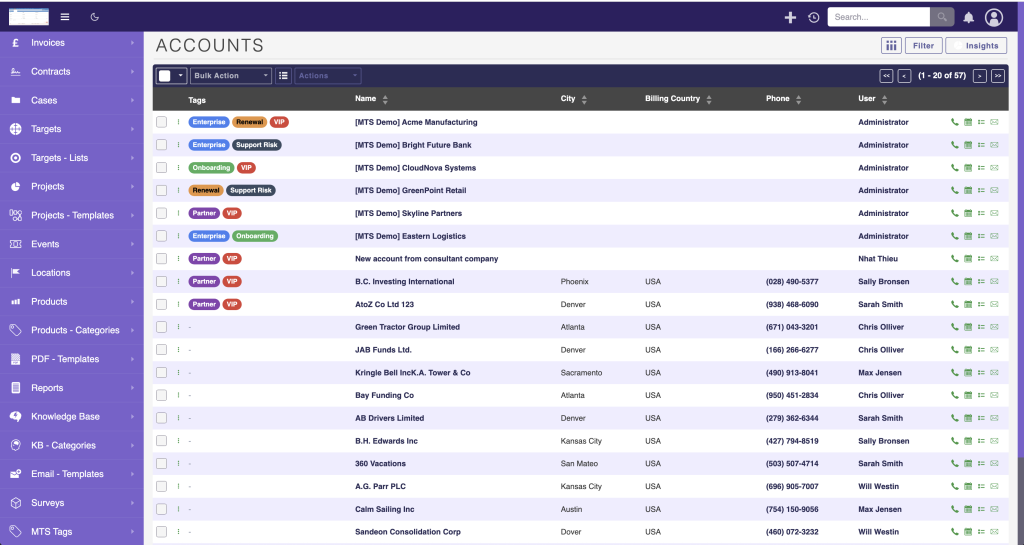
- Visual Identification: Spot “VIP” clients or “Urgent” cases immediately in the list view thanks to vibrant color chips.
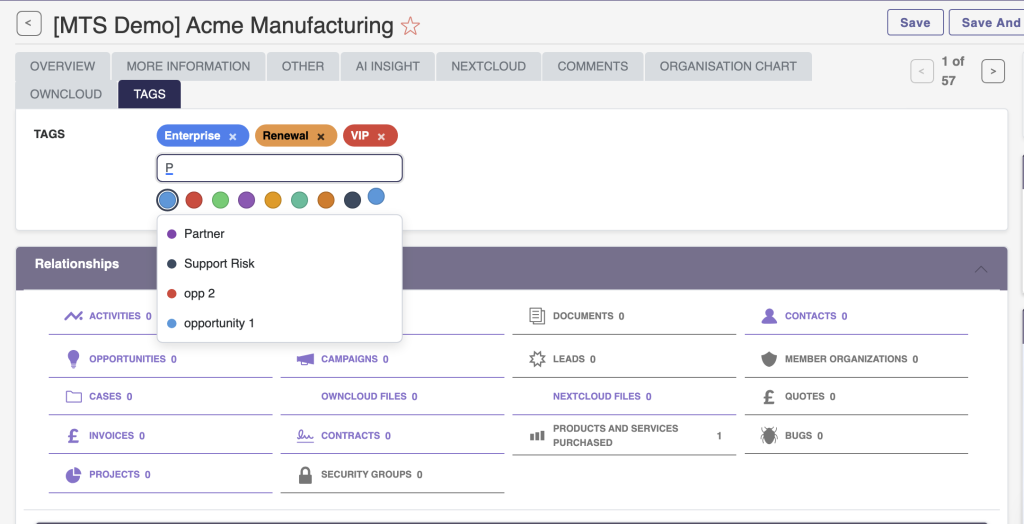
- Flexible Taxonomy: Apply multiple tags to a single record without building complex multi-select fields.
- Lightning Fast Filtering: Click any tag in the list view to instantly filter and segment your CRM data.
- Controlled Vocabulary: Let users create tags on the fly, or restrict them to a predefined list approved by admins.
📸 Visual Walkthrough & Interface Preview
Take a visual tour of the features and settings:
Enterprise-grade data organization:
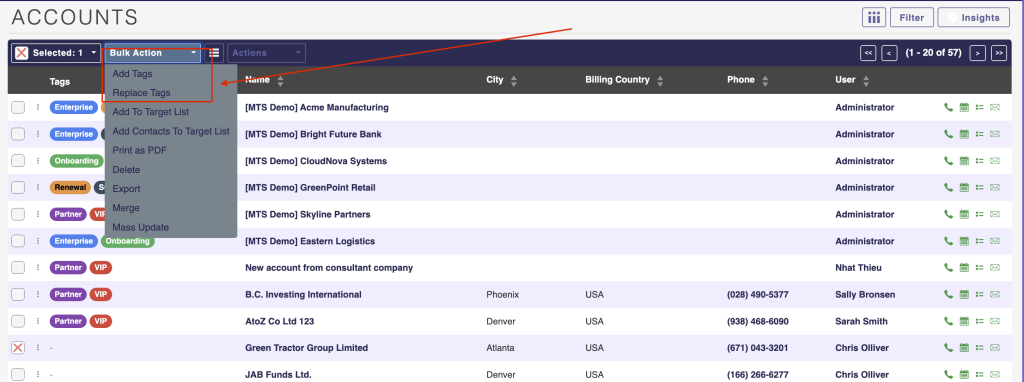
Mass Bulk Tagging
Select 50 records in the list view and apply a "Trade Show 2025" tag to all of them in a single click.
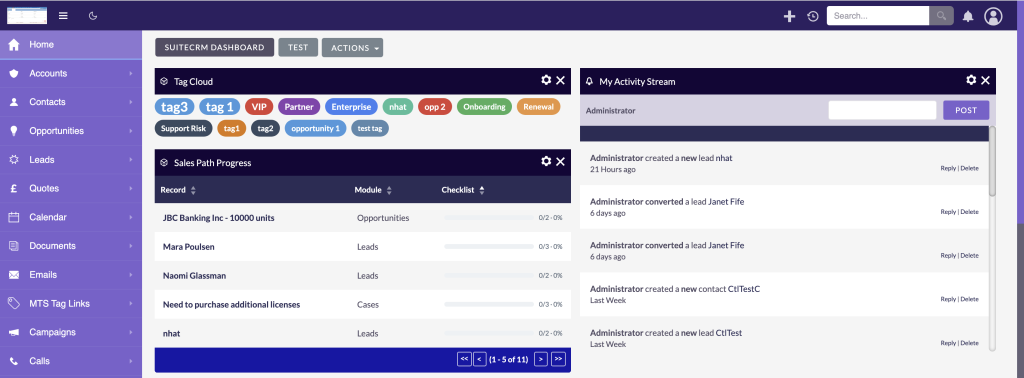
Tag Cloud Dashboard
Gain insights at a glance with a visual Tag Cloud dashlet showing the most frequently used categories.
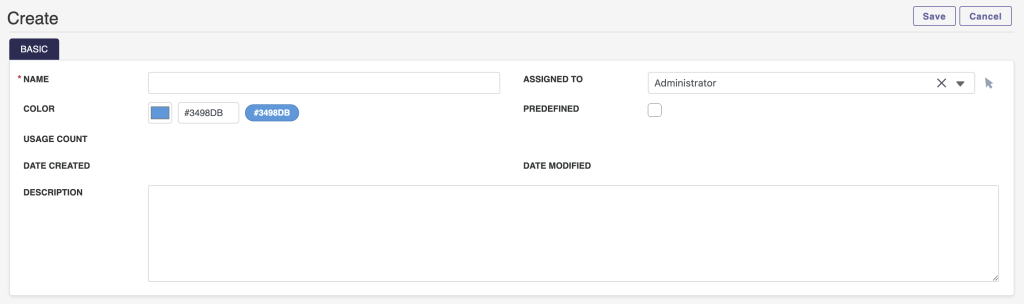
Color Picker Engine
Assign distinct HEX background colors to specific tags so critical statuses always stand out.
Installation & Setup Guide
Introduce enterprise-grade visual categorization to your SuiteCRM instance.
1. How to Install
- Log into SuiteCRM as an Administrator.
- Navigate to Admin > Module Loader.
- Upload the plugin ZIP file and click Install.
- Run a Quick Repair and Rebuild.
2. Applying Tags to Modules
- Go to Admin > Studio and select your target module.
- Click Fields > Add Field and choose the MTS Tag data type.
- Add the new field to your Edit View, Detail View, and List View layouts.
3. Managing Global Tags
Administrators can oversee all tags across the system to maintain data cleanliness.
Tag Manager: Go to Admin > MTS Tag Manager to manually edit tag names, assign custom HEX background colors, or merge duplicate tags created by users.
No changelog entries yet.
Are these tags searchable in Advanced Search?
Yes, the Tag Field integrates deeply with SuiteCRM search. You can easily filter records by one or multiple tags.
Can we restrict who can create new tags?
Absolutely. You can enable 'Predefined-Only Mode' allowing users to only select from tags pre-approved by the administrator.
Does this work on SuiteCRM 8?
Yes, MTS Tag Field is fully optimized to render beautiful colored chips in both the SuiteCRM 7 Classic UI and the new SuiteCRM 8 Angular UI.
Related SuiteCRM Plugins
MTS Opportunity Line Items
Bridge the gap between Opportunities and Quotes by adding full line-item product tracking, automated totals, and 1-click quote conversion.

MTS Record Score
Automatically calculate quality scores and letter grades (A/B/C/D) to help sales reps focus on their highest-converting opportunities.
SuiteCRM Group Layout: Custom Views per Security Group in SuiteCRM 8
Is your CRM cluttered with unnecessary fields, irrelevant tabs, or complex list columns that confuse your team? A generic interface rarely fits a growing organization. Sales representatives need quick access to lead stages, while managers require high-level reporting fields. Showing the exact same form layout to every department leads to data errors and lower CRM […]
Request this plugin
We don't run automated checkout yet — every order goes through a short form so we can confirm your SuiteCRM version, license type, and send a secure payment link.