
MTS Duplicate Check (SuiteCRM 8)
What is SuiteCRM Duplicate Check?
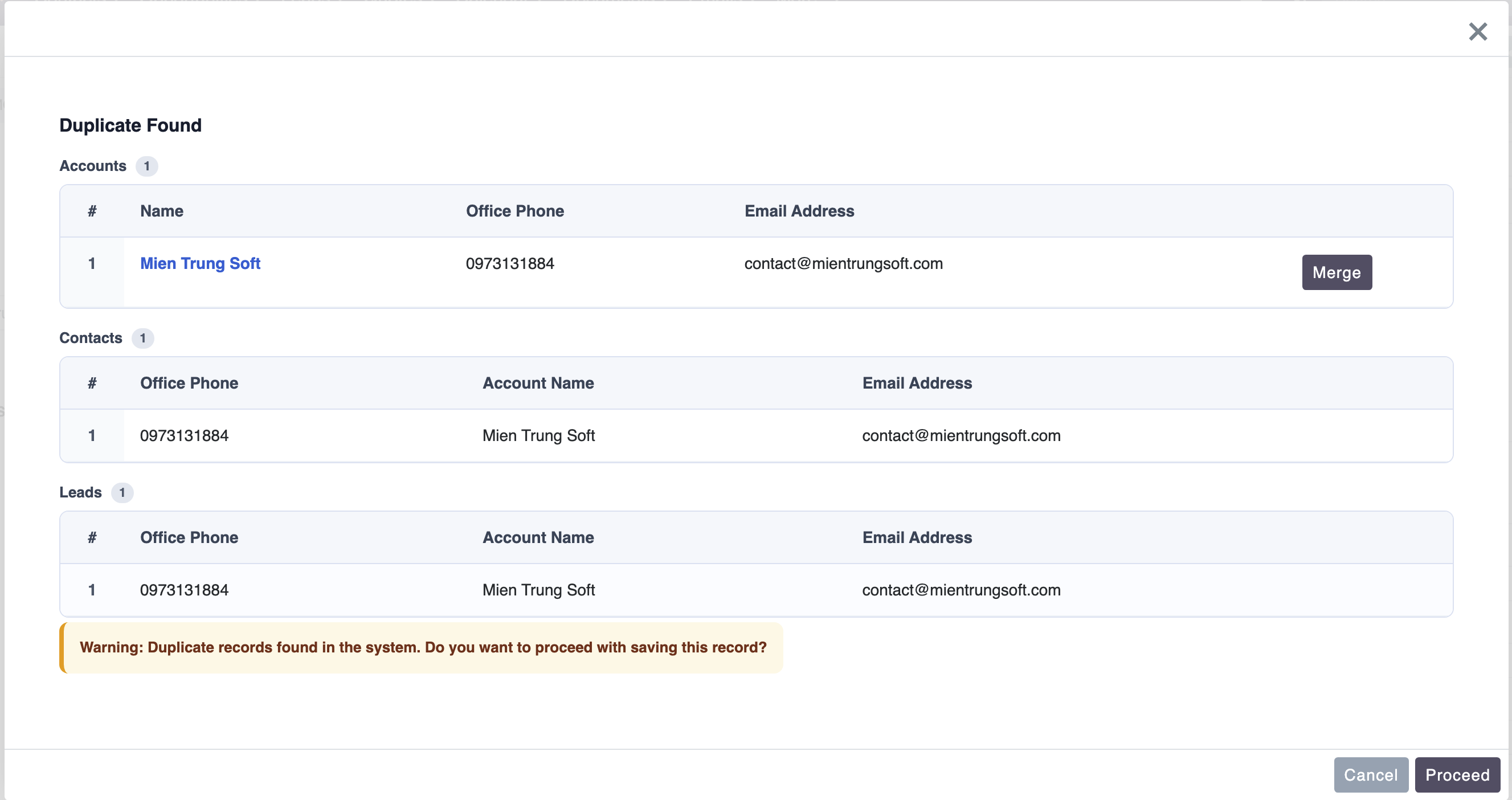
SuiteCRM Duplicate Check is real-time duplicate prevention for your CRM. The MTS SuiteCRM Duplicate Check plugin scans Leads, Contacts, Accounts and custom modules as users type and shows an instant warning modal before a duplicate record is saved in SuiteCRM 8 — keeping your database clean at the point of entry.
How does duplicate checking work in SuiteCRM?
You choose which fields to match (for example name, email or phone). When a user enters data, SuiteCRM Duplicate Check compares it against existing records in real time and flags potential duplicates instantly, so dirty data never gets in.
Real-Time Duplicate Prevention & Instant Warning Modals for SuiteCRM 8
Stop dirty data before it enters your CRM with real-time duplicate matching popups on Leads, Contacts, Accounts, and custom modules.
Why Choose MTS Duplicate Check (SuiteCRM 8)?
- Prevents duplicate records in real time as users type — before saving anything to the database.
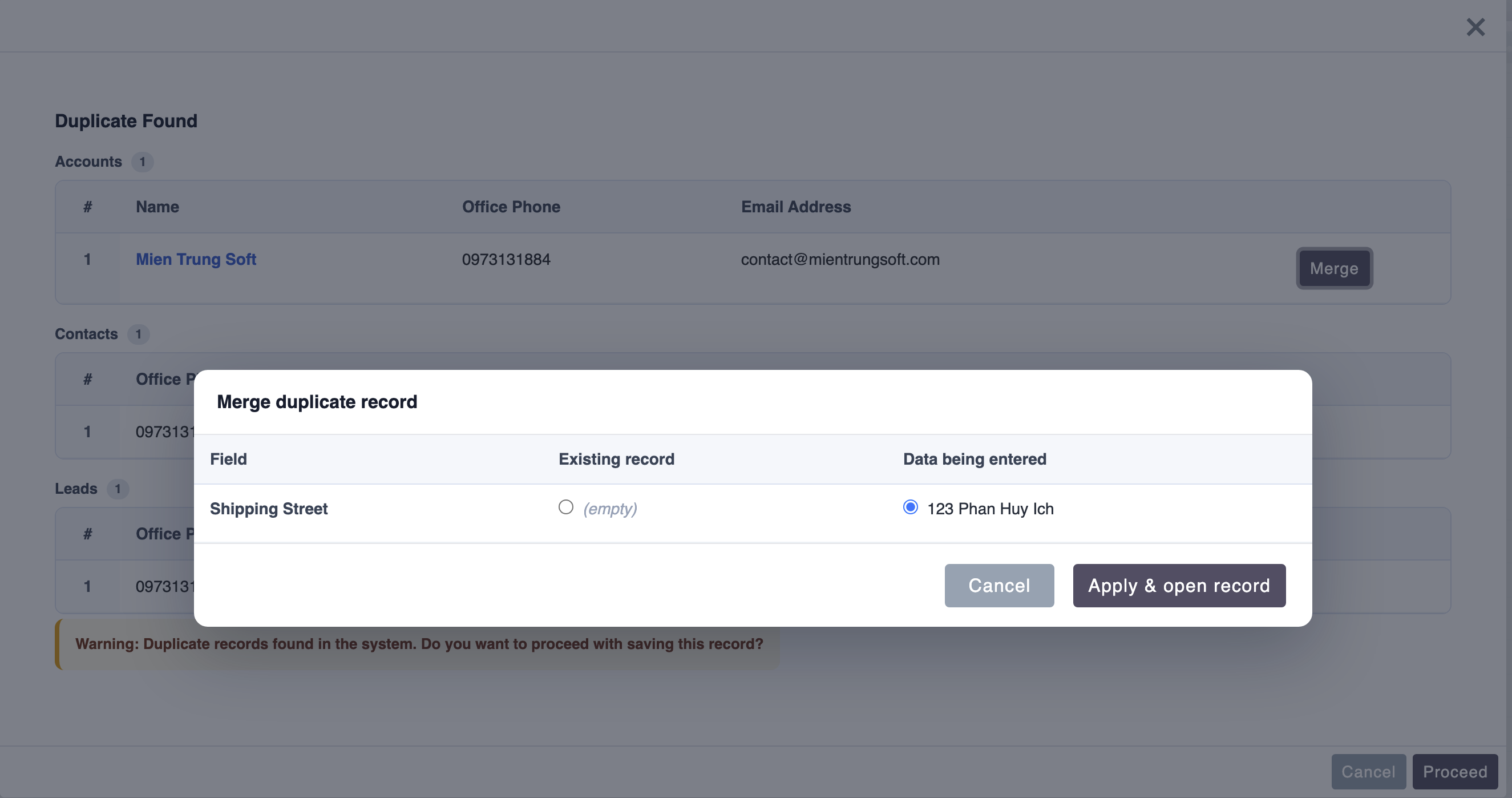
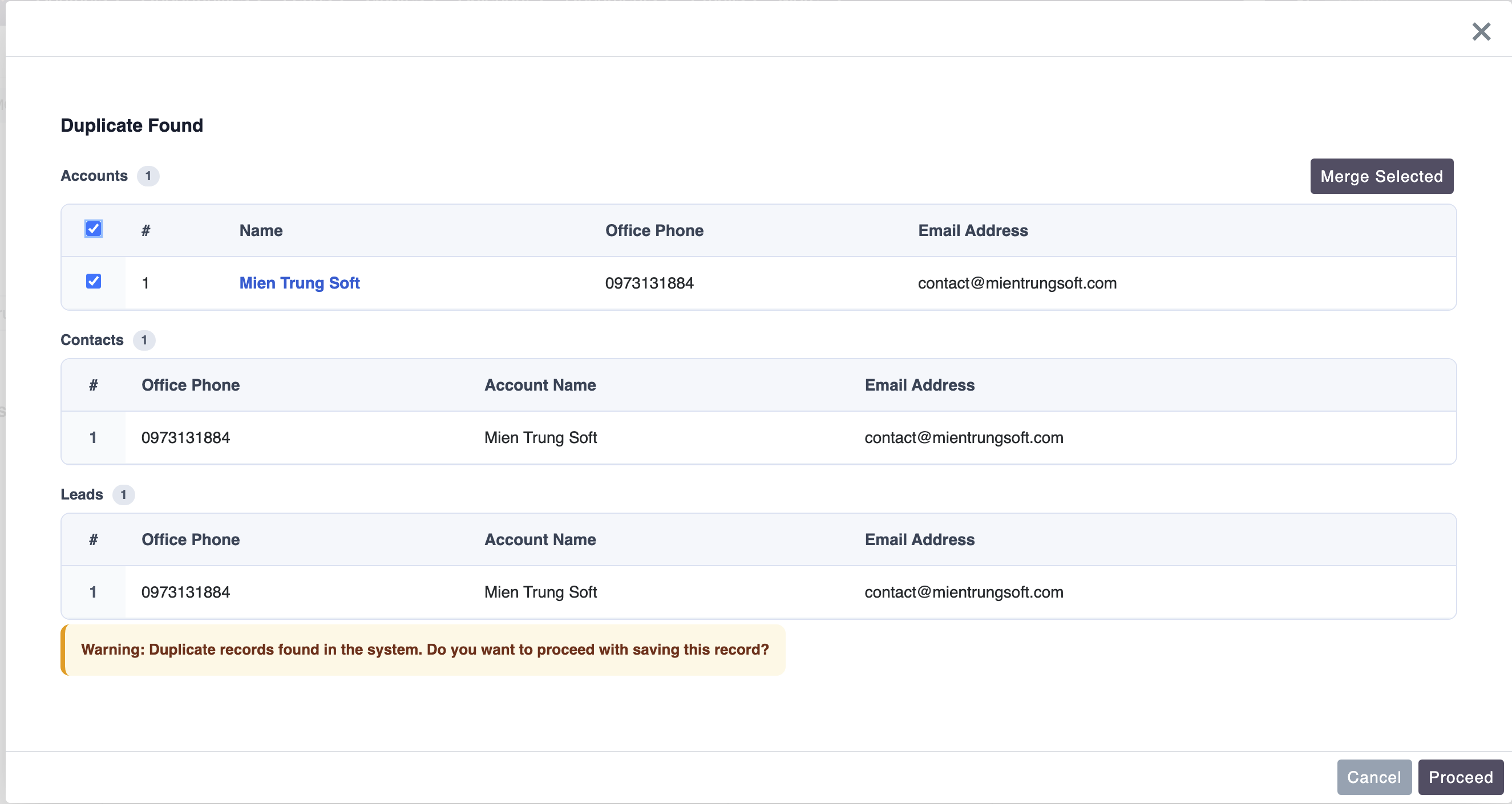
- Interactive popup modal displays matching existing records with 1-click merge or update options.
- Configurable matching rules across email, phone number, company name, or custom fields.
- Native SuiteCRM 8 Angular architecture for zero-delay instant feedback.
Key Capabilities & Features
- Real-Time Input Interceptor: Checks for matches as soon as an email or phone number is entered.
- Smart Fuzzy Matching: Detects duplicates despite variations in phone formatting or minor typos.
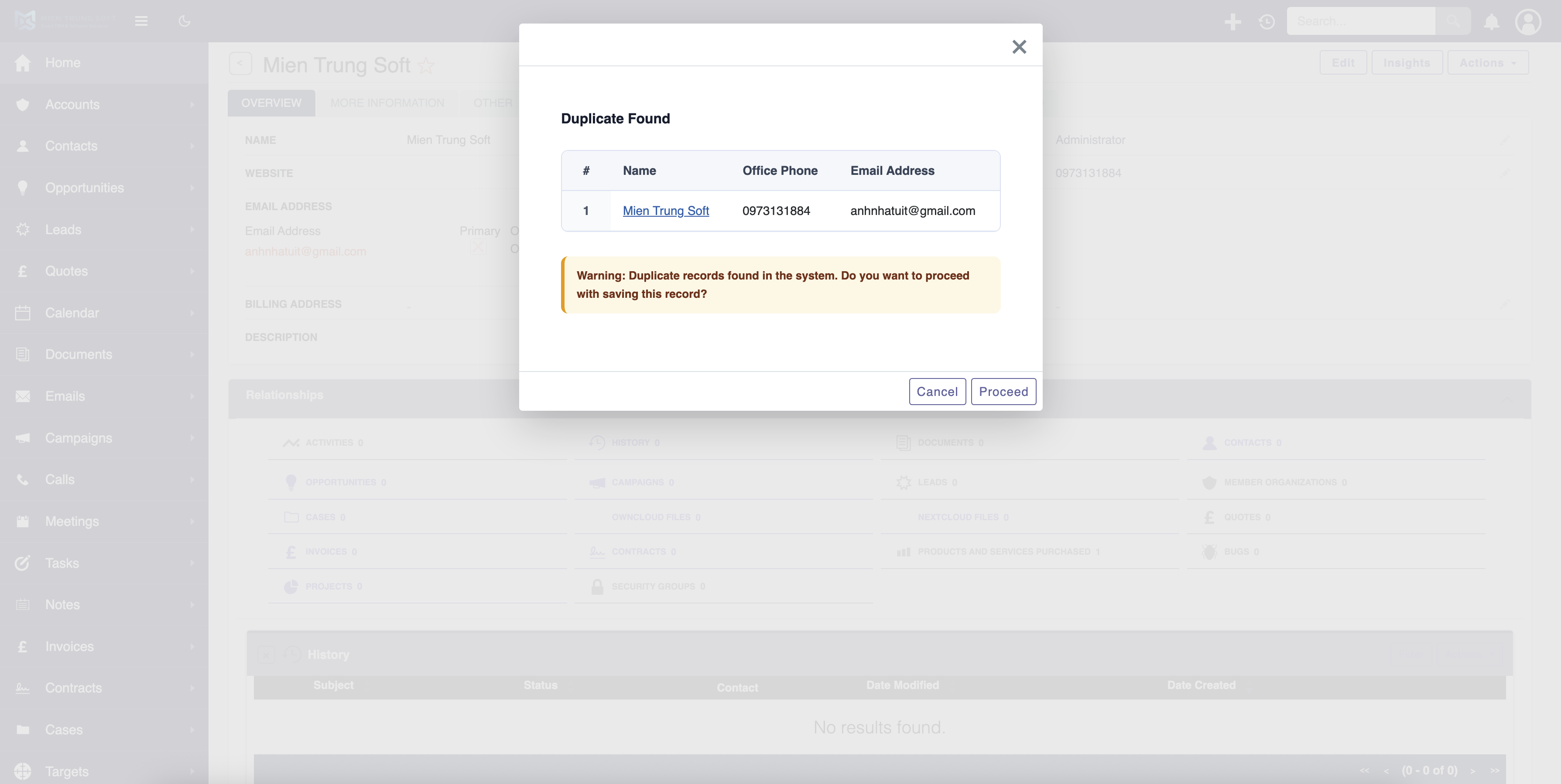
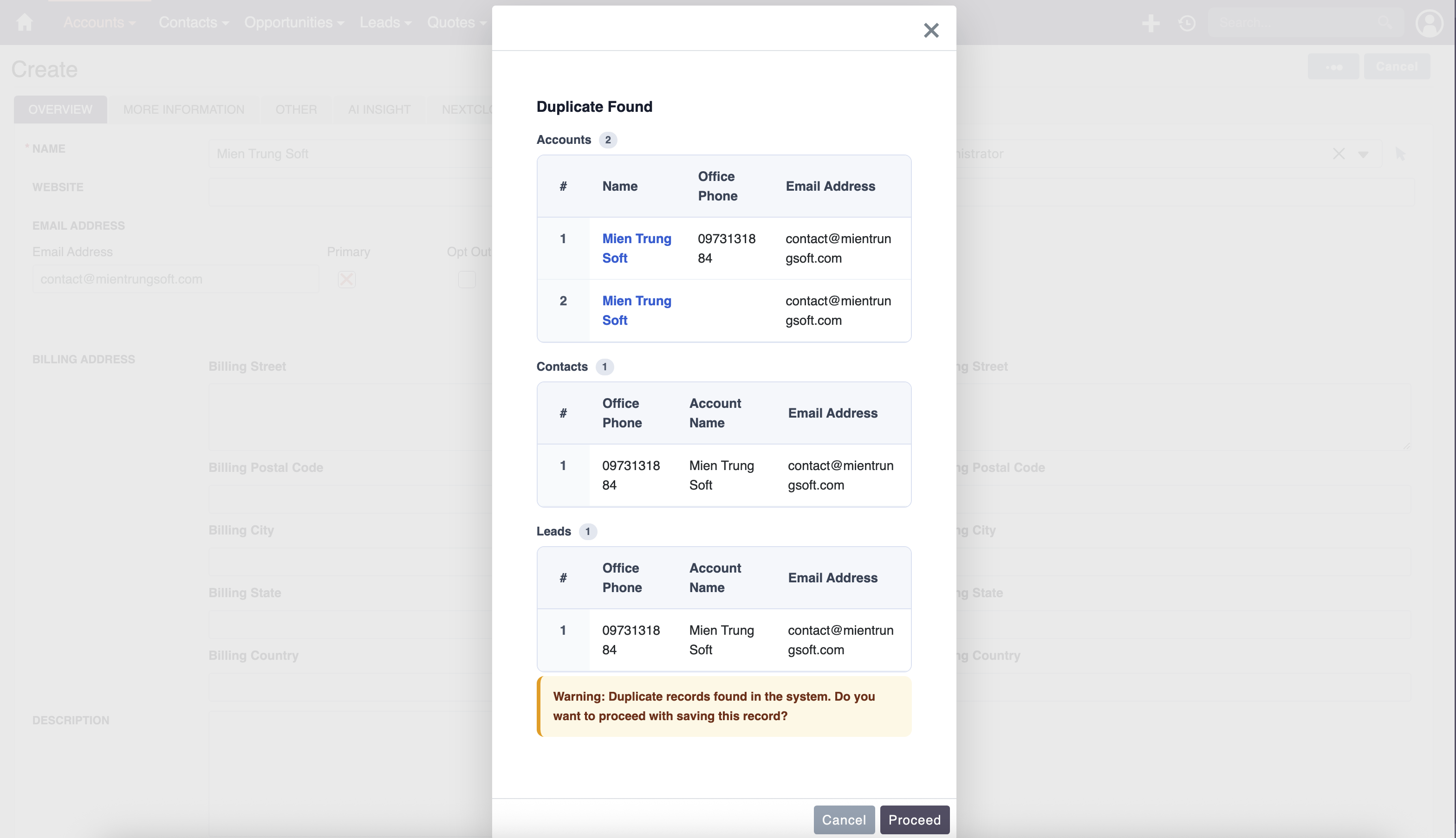
- Interactive Duplicate Modal: Shows existing record owners, creation dates, and provides a direct link to existing profiles.
- Custom Multi-Field Rules: Combine multiple criteria (e.g. Email OR (First Name AND Last Name AND Company)).
Popular Business Use Cases
- Preventing sales reps from creating duplicate Leads already assigned to another colleague.
- Catching existing Contacts when creating new records from business cards.
- Maintaining clean, authoritative Account databases for accurate analytics.
Enterprise Grade & Upgrade-Safe: Built strictly following SuiteCRM architecture standards. All modifications are stored safely in upgrade-resistant directories, ensuring smooth transitions across CRM version updates.
📸 Visual Walkthrough & Interface Preview
Take a visual tour of MTS Duplicate Check (SuiteCRM 8) features, intuitive layouts, and configuration options inside SuiteCRM:
Feature Breakdown for MTS Duplicate Check (SuiteCRM 8)
Explore the core functionality, productivity tools, and administrative capabilities included with this plugin.
Real-Time Input Interceptor
Checks for matches as soon as an email or phone number is entered.Smart Fuzzy Matching
Detects duplicates despite variations in phone formatting or minor typos.Interactive Duplicate Modal
Shows existing record owners, creation dates, and provides a direct link to existing profiles.Custom Multi-Field Rules
Combine multiple criteria (e.g. Email OR (First Name AND Last Name AND Company)).MTS Duplicate Check (SuiteCRM 8) - Documentation & Setup Guide
1. Prerequisites & System Requirements
- CRM Compatibility: SuiteCRM 8.0 - 8.7+
- PHP Version: PHP 7.4, 8.0, 8.1, 8.2, or 8.3
- Database: MySQL 5.7+ / MariaDB 10.3+
- Admin Privileges: Full SuiteCRM Administrator account required for installation.
2. Installation via Module Loader
- Download the installation package (
mts-duplicate-check.zip) from your Mien Trung Soft account. - Log in to your SuiteCRM dashboard as an Administrator.
- Navigate to Admin > Module Loader.
- Under Upload Installation Package, click Choose File and select
mts-duplicate-check.zip. - Click Upload.
- Once uploaded, locate the module in the list and click Install.
- Review and accept the license terms, then click Commit.
- After installation completes, navigate to Admin > Repair and run Quick Repair and Rebuild.
3. Configuration & Administration
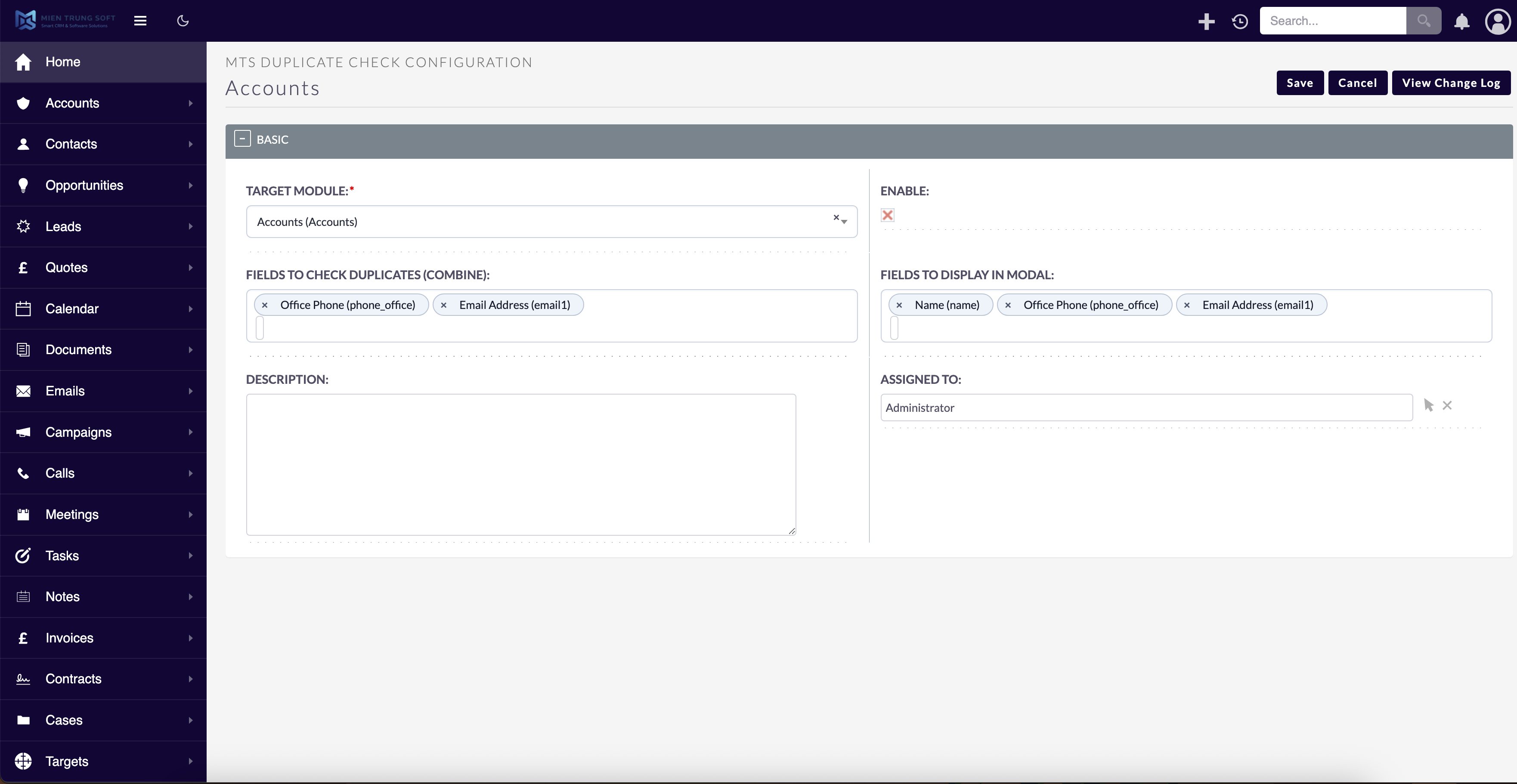
Navigate to Admin > MTS Duplicate Check (v8). Define duplicate matching rules per module and customize popup warning behavior. Configure user role permissions under Admin > Role Management if you wish to restrict module access to specific teams or security groups.4. Troubleshooting & Support
- Assets not loading? Run Quick Repair and Rebuild and clear your browser cache (Ctrl+F5 or Cmd+Shift+R).
- Permission issues? Ensure correct file permissions on your SuiteCRM server (
chmod -R 755 custom/ modules/). - Need technical assistance? Contact our dedicated support team via your Mien Trung Soft portal or email us with your CRM error logs.
What is SuiteCRM Duplicate Check?
How do I prevent duplicates in SuiteCRM?
Is MTS Duplicate Check (SuiteCRM 8) compatible with SuiteCRM 8?
Does this plugin modify core SuiteCRM files?
Can I install this on development or staging instances?
What is included with technical support?
How do I receive plugin updates?
Related SuiteCRM Plugins

MTS SuiteCRM 8 Theme Editor
MTS SuiteCRM Theme Editor — customize your SuiteCRM theme with no code: dark mode, brand colors, sidebar & responsive UI for SuiteCRM 8. Restyle your CRM today.

MTS User Activity Log
Track every user login, view, edit, and deletion with detailed diff history — plus 1-click restore for accidentally deleted data.
MTS Custom Login Page for SuiteCRM | Professional Branded Portal
Transform your SuiteCRM 8 login screen with custom logos, responsive templates, and dynamic background slideshows. No coding required.
Request this plugin
We don't run automated checkout yet — every order goes through a short form so we can confirm your SuiteCRM version, license type, and send a secure payment link.