

MTS Cleaner
Database Optimization & Soft-Deleted Record Purging Tool for SuiteCRM
Boost SuiteCRM speed and reduce database size by scanning, purging, or safely archiving soft-deleted records across all modules.
Why Choose MTS Cleaner?
- Reclaim gigabytes of database disk space by permanently purging orphaned soft-deleted records (
deleted=1). - Speed up SQL queries and report generation across large CRM instances.
- Safe preview mode shows exact record counts before permanent deletion.
- Schedule automated background maintenance cron jobs to keep your database lean.
Key Capabilities & Features
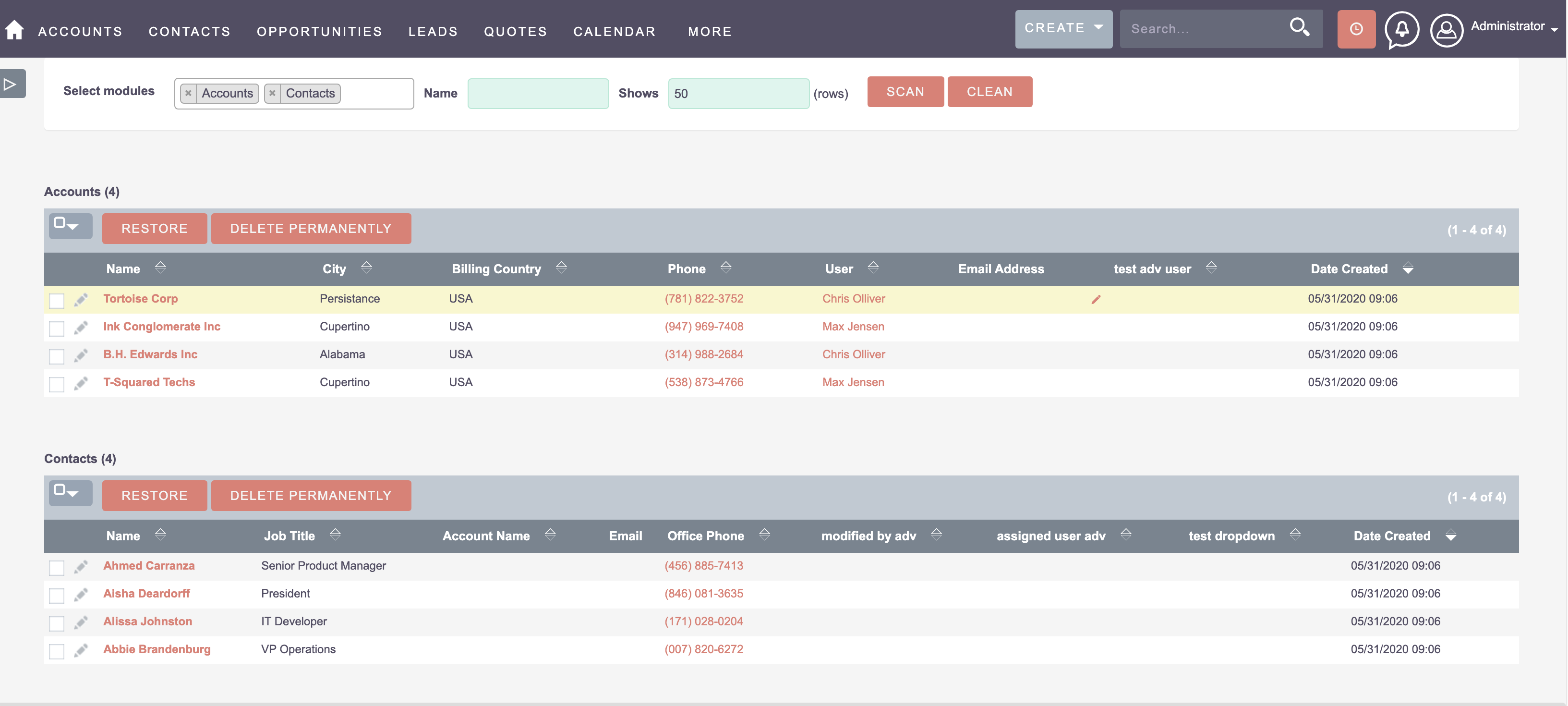
- Module-by-Module Database Scanner: Scans all standard and custom tables to report soft-deleted record volumes.
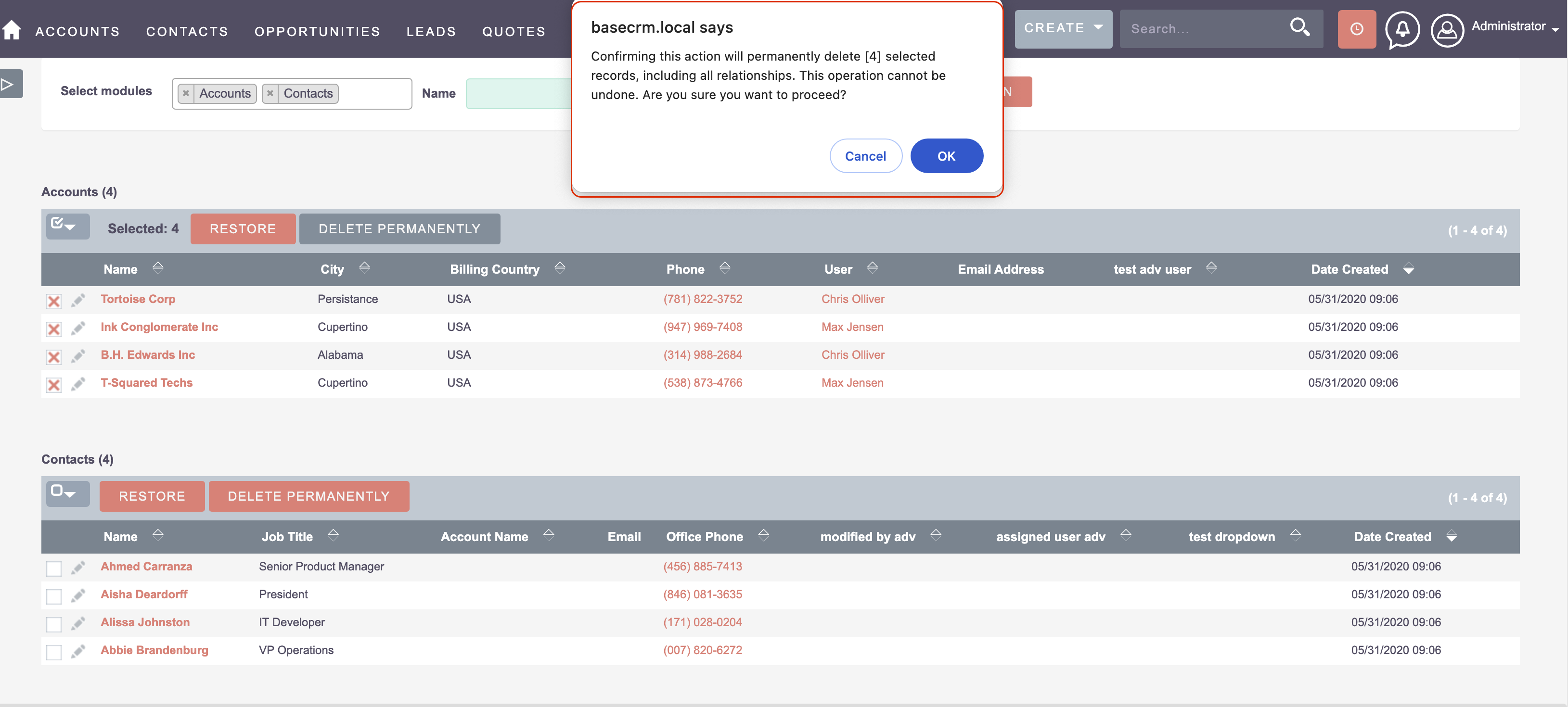
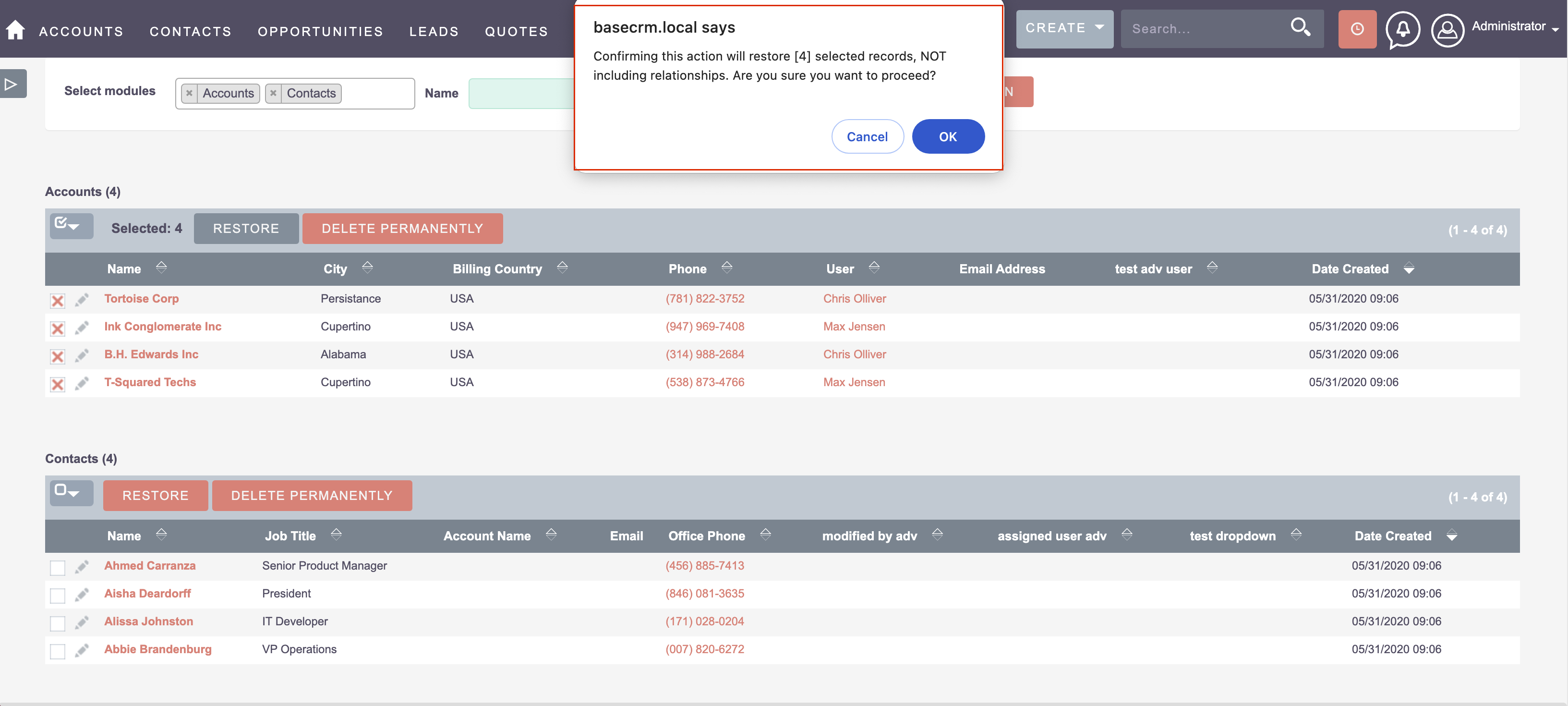
- Safe Bulk Purging: Select specific modules and date ranges to permanently delete orphaned rows.
- Automated Scheduled Cleanup: Set up recurring maintenance jobs via SuiteCRM Schedulers.
- Table Index Optimization: Automatically runs MySQL OPTIMIZE TABLE after purging to reclaim disk space.
Popular Business Use Cases
- CRM administrators maintaining high-volume instances with millions of legacy records.
- Pre-migration database cleanup before upgrading to SuiteCRM 8.
- GDPR compliance data shredding for removed customer records.
Enterprise Grade & Upgrade-Safe: Built strictly following SuiteCRM architecture standards. All modifications are stored safely in upgrade-resistant directories, ensuring smooth transitions across CRM version updates.
📸 Visual Walkthrough & Interface Preview
Take a visual tour of MTS Cleaner features, intuitive layouts, and configuration options inside SuiteCRM:
Feature Breakdown for MTS Cleaner
Explore the core functionality, productivity tools, and administrative capabilities included with this plugin.
Module-by-Module Database Scanner
Scans all standard and custom tables to report soft-deleted record volumes.
Safe Bulk Purging
Select specific modules and date ranges to permanently delete orphaned rows.
Automated Scheduled Cleanup
Set up recurring maintenance jobs via SuiteCRM Schedulers.
Table Index Optimization
Automatically runs MySQL OPTIMIZE TABLE after purging to reclaim disk space.
MTS Cleaner - Documentation & Setup Guide
1. Prerequisites & System Requirements
- CRM Compatibility: SuiteCRM 7.10 - 7.14 and SuiteCRM 8.0 - 8.7+
- PHP Version: PHP 7.4, 8.0, 8.1, 8.2, or 8.3
- Database: MySQL 5.7+ / MariaDB 10.3+
- Admin Privileges: Full SuiteCRM Administrator account required for installation.
2. Installation via Module Loader
- Download the installation package (
mts-cleaner.zip) from your Mien Trung Soft account. - Log in to your SuiteCRM dashboard as an Administrator.
- Navigate to Admin > Module Loader.
- Under Upload Installation Package, click Choose File and select
mts-cleaner.zip. - Click Upload.
- Once uploaded, locate the module in the list and click Install.
- Review and accept the license terms, then click Commit.
- After installation completes, navigate to Admin > Repair and run Quick Repair and Rebuild.
3. Configuration & Administration
Navigate to Admin > MTS Cleaner. Click Scan Database to view deleted record statistics, select tables to clean, and execute or schedule cleanup.
Configure user role permissions under Admin > Role Management if you wish to restrict module access to specific teams or security groups.
4. Troubleshooting & Support
- Assets not loading? Run Quick Repair and Rebuild and clear your browser cache (Ctrl+F5 or Cmd+Shift+R).
- Permission issues? Ensure correct file permissions on your SuiteCRM server (
chmod -R 755 custom/ modules/). - Need technical assistance? Contact our dedicated support team via your Mien Trung Soft portal or email us with your CRM error logs.
Is MTS Cleaner compatible with SuiteCRM 7 and 8?
Does this plugin modify core SuiteCRM files?
Can I install this on development or staging instances?
What is included with technical support?
How do I receive plugin updates?
Related SuiteCRM Plugins

MTS Language Translate Tool
Translate labels, dropdowns, module names, and custom strings directly inside SuiteCRM without editing PHP language files.
SuiteCRM Group Layout: Custom Views per Security Group in SuiteCRM 8
Is your CRM cluttered with unnecessary fields, irrelevant tabs, or complex list columns that confuse your team? A generic interface rarely fits a growing organization. Sales representatives need quick access to lead stages, while managers require high-level reporting fields. Showing the exact same form layout to every department leads to data errors and lower CRM […]
MTS Multi Organization
Eliminate the cost of maintaining multiple CRM servers — partition your SuiteCRM instance into isolated company workspaces with distinct numbering and branding.
Request this plugin
We don't run automated checkout yet — every order goes through a short form so we can confirm your SuiteCRM version, license type, and send a secure payment link.